

Download Jamendo – Free Independent Music App, No Ads, Legal Streaming
Overview
Jamendo is a vibrant entertainment app that brings the world of independent music straight to your device. Unlike mainstream streaming giants, Jamendo focuses exclusively on indie artists, offering a library of more than 500,000 tracks across genres such as Pop, Rock, Electro, Hip‑Hop, Jazz, and many more. The platform is built around the idea of discovery: listeners can explore curated playlists, charts, and “similar artist” recommendations that surface hidden gems you might never find on larger services. Because every song is uploaded under Creative Commons licences, streaming and downloading are completely legal and free of advertisements, making Jamendo an appealing alternative for budget‑conscious users who still want a rich listening experience.
The community aspect is another strong point. With over 3.5 million members worldwide, Jamendo fosters a supportive environment where fans can follow their favorite creators, create personal playlists, and even boost an artist’s exposure with a single play. While registration is optional, a free account lets you save your favorite tracks, sync playlists across devices, and receive personalized recommendations based on your listening habits. For Apple users, note that the download feature is not available on iPhone, iPad, or iPod touch due to platform restrictions, but streaming works flawlessly on iOS.
In a market saturated with subscription‑based services like Spotify, Tidal, and Deezer, Jamendo stands out by championing independent talent, providing an ad‑free environment, and keeping the core experience completely free. Whether you’re a casual listener looking for fresh background music or an avid supporter of indie musicians, Jamendo offers a secure, legal, and richly curated music library that’s worth exploring.
Key Features and Benefits
- Over 500,000 ad‑free tracks from 40,000+ independent artists.
- Genre‑spanning library: Pop, Rock, Electro, Hip‑Hop, Jazz, Classical, and more.
- Curated playlists created by music experts for different moods and activities.
- Dynamic “Similar Artists” and “You Might Also Like” suggestions powered by AI.
- Free streaming and legal downloads under Creative Commons licences.
- No mandatory subscription – all core features are completely free.
- Option to create a free account for saving playlists, following artists, and syncing across devices.
- Radio stations and themed collections for continuous, hands‑free listening.
- Charts and featured sections that highlight emerging talent and trending tracks.
- Secure platform with a proven track record of reliability and user trust.
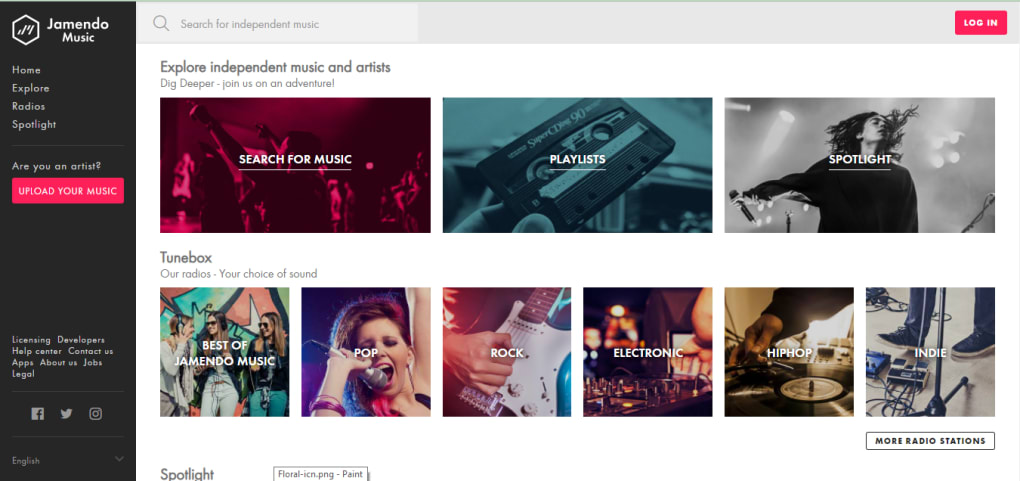
Beyond the raw numbers, Jamendo’s interface is designed for effortless discovery. The home screen showcases trending charts, new releases, and genre hubs, allowing you to dive straight into the music that matches your current mood. The “Explore” tab aggregates playlists crafted by both Jamendo’s editorial team and community contributors, giving you a blend of professional curation and user‑generated mixes.
One of the most compelling benefits is the direct support for artists. Because each play contributes to an artist’s exposure and potential revenue, listeners feel a genuine connection to the creators behind the music. This symbiotic relationship is reinforced by Jamendo’s “Follow” feature, which notifies you of new releases, upcoming concerts, or exclusive content from the musicians you love.
For power users, the ability to download tracks for offline listening (where supported) ensures uninterrupted playback on the go. Even though iOS devices lack the download function, streaming remains smooth, with minimal buffering thanks to Jamendo’s optimized servers. Overall, the feature set delivers a comprehensive, user‑friendly experience that rivals paid services while staying completely free.
Installation, Usage & Compatibility
Downloading the App
Jamendo is available for Windows, macOS, Android, and iOS (stream‑only). To install, visit the official website or your device’s app store. On Windows and macOS, download the desktop client from jamendo.com – the installer is a small .exe or .dmg file that runs in seconds. Android users can find the app on Google Play, while iOS users should search the App Store for “Jamendo – Free Music.” Once the download completes, follow the on‑screen prompts to grant the necessary permissions (storage for offline downloads on Android/Windows, microphone for voice search, etc.).
First‑Time Setup
When you launch Jamendo for the first time, you’ll be greeted with a welcome tour that highlights the main navigation tabs: Home, Explore, Radio, Library, and Profile. Registration is optional, but creating a free account is recommended if you want to save playlists or follow artists. Signing up requires only an email address or a quick social login via Facebook or Google. After account creation, the app automatically syncs any saved content across devices linked to the same account.
How to Use the Platform
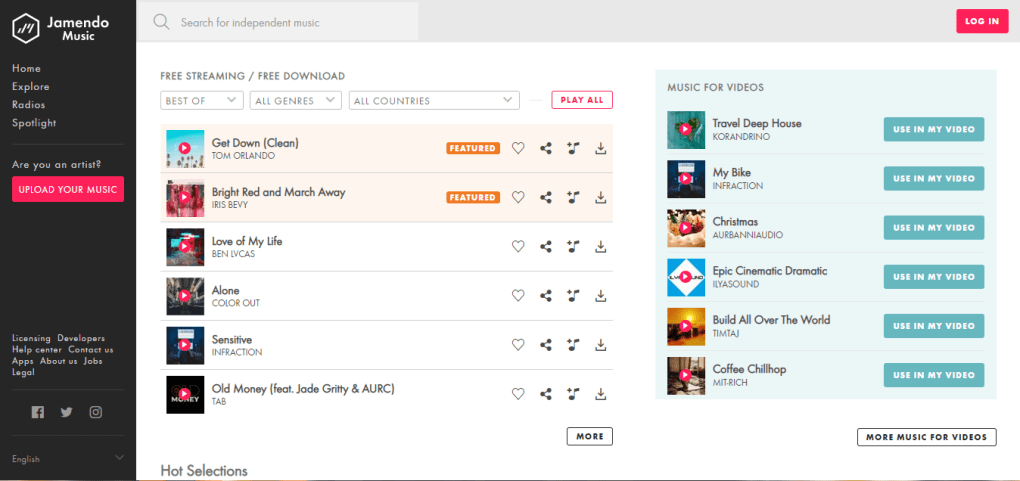
Browsing starts with the Home feed, where you’ll see top charts, new releases, and editorial playlists. Use the “Search” bar to find specific tracks, albums, or artists. The AI‑driven recommendation engine updates in real time based on your listening history, suggesting similar songs at the bottom of each track page. To create a playlist, tap the “+” icon on any track and choose “Add to New Playlist.” Give your playlist a name, select a cover image, and you’re ready to curate your personal soundtrack.
Compatibility Details
Jamendo supports the following operating systems:
- Windows 10 and later (64‑bit)
- macOS 10.13 (High Sierra) and later
- Android 6.0 (Marshmallow) and later
- iOS 12.0 and later (stream‑only, no download capability)
The desktop client integrates with the system’s media keys, allowing you to play, pause, or skip tracks without leaving your current application. On mobile, the app supports background playback, Bluetooth audio, and integrates with Android Auto and Apple CarPlay for a seamless in‑car experience. Regular updates are pushed automatically through the respective app stores, ensuring you always have the latest features and security patches.
Pros, Cons, FAQ & Conclusion
Pros
- Massive catalog of free, ad‑free indie music.
- Legal streaming and downloading under Creative Commons licences.
- No subscription fees – all core features are completely free.
- Robust discovery tools: curated playlists, charts, and AI recommendations.
- Supports offline listening on Windows, macOS, and Android.
- Secure platform with a large, active community of listeners and creators.
Cons
- Download feature unavailable on iOS devices due to Apple restrictions.
- Library focuses solely on independent artists, so mainstream hits may be missing.
- Occasional gaps in metadata (e.g., missing album art) for some tracks.
- Limited social sharing options compared to larger streaming services.
Frequently Asked Questions
Is Jamendo really free to use?
Yes. All streaming, playlist creation, and downloading (where supported) are completely free. There are no hidden subscription fees.
Can I download songs for offline listening on iPhone?
No. Apple’s policy prevents Jamendo from offering a download button on iOS. You can still stream music offline by keeping the app open, but true offline downloads require Android, Windows, or macOS.
Is the music on Jamendo legal?
Absolutely. Every track is uploaded under Creative Commons licences, meaning the artists have granted permission for free streaming and download.
Do I need an account to use Jamendo?
No. You can browse and listen without signing up. However, creating a free account lets you save playlists, follow artists, and sync your library across devices.
How often is the music library updated?
Jamendo receives daily uploads from its community of indie musicians, so the catalog is constantly expanding with fresh releases.
Conclusion & Call to Action
Jamendo delivers a compelling mix of free, ad‑free indie music, robust discovery tools, and a community‑first ethos that larger platforms often overlook. While the lack of iOS download capability and the focus on independent rather than mainstream tracks may limit some users, the overall value proposition is hard to beat for anyone who wants to explore fresh sounds without a subscription fee. With its secure, legal framework and seamless cross‑platform support, Jamendo stands as a top choice for music lovers eager to support emerging artists.
Ready to dive into a world of independent music? Download Jamendo today and start building your personalized soundtrack—no ads, no cost, just pure discovery.
Jamendo excels at providing a vast, ad‑free library of indie music while remaining completely free. The user interface is intuitive, discovery features are strong, and the platform’s legal compliance gives peace of mind. Minor drawbacks include the missing iOS download feature and occasional metadata gaps, but overall it offers excellent value for both listeners and artists.



.png)



